Find this useful? Share the visual.
The Short Version
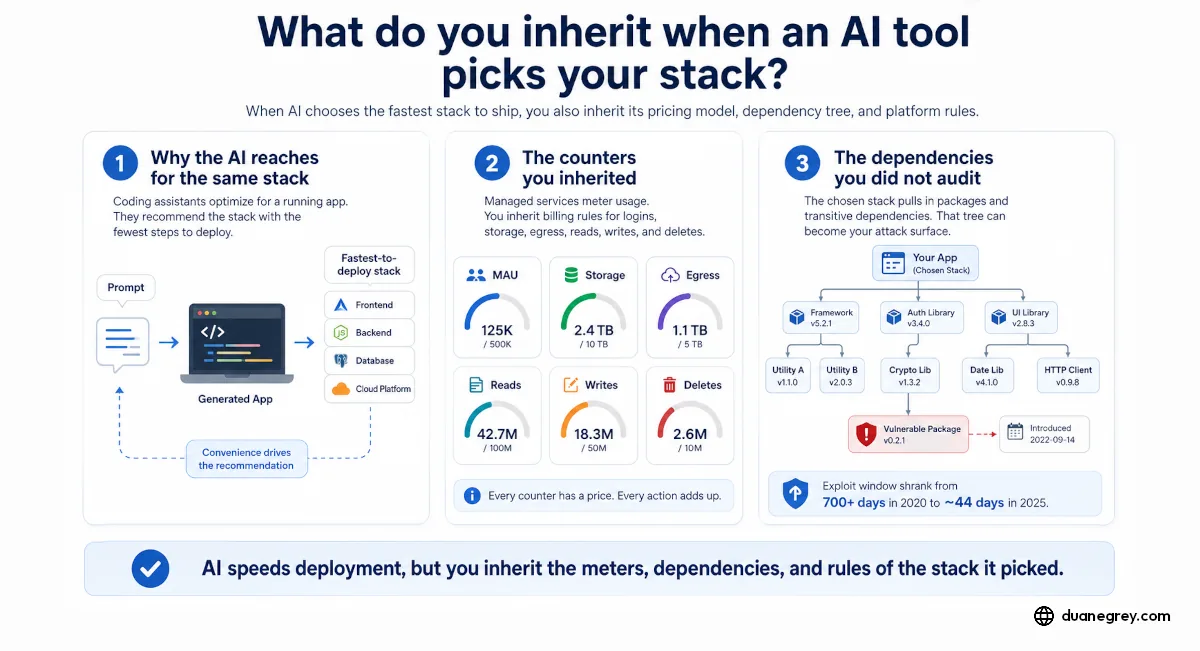
When an AI tool builds an app, it also picks the stack, usually the one that deploys with the least friction, and you inherit its terms. Those terms include metered counters for active users, storage, and egress, a bundled upgrade path where outgrowing one resource buys a whole new server tier, and a dependency tree you did not review. That tree is now an attack path. The 2025 Shai-Hulud campaign compromised hundreds of npm packages through a single phished maintainer, and the gap from a public vulnerability to a working exploit fell from about 700 days in 2020 to roughly 44 in 2025, partly because AI now reads codebases for flaws as readily as it writes them.
Let an AI tool build your application and it will pick the stack for you. It reaches for the one that deploys with the least friction, because the system doing the recommending is also the one writing the code. That stack arrives with meters, dependencies, and rules you did not choose, and may not know you are now responsible for.
The product it reaches for is often a good one. Supabase is a strong piece of work, good enough that coding tools and platforms like Netlify wire it in by default, so a new builder does not have to set up a database, a login system, or file storage by hand. Google AI Studio may reach for Firebase instead. Each handles the plumbing. Each also comes with terms you inherit the moment it is wired in.
Why the AI Reaches for the Same Stack
A coding assistant optimizes for getting you to a running app. The recommended stack is the path with the fewest steps to deploy, so that is what it suggests, and then what it builds. You asked for an app with logins and image uploads. You got Supabase for both, or Firebase, wired in and working.
You did not make the stack decision, though. The tool made it, on the basis of what ships fastest, and the decision came with terms.
The Counters You Inherited
Managed services meter usage. Supabase counts monthly active users on login, file storage in gigabytes, and egress, the data leaving their network when your app serves those files. The Pro plan includes generous amounts of each. Generous is not unlimited, and a counter you are not watching is still counting.
Firebase counts different things under different rules. Its default database bills per read, write, and delete, so an app that reads a lot pays for the reads, where Supabase's Postgres does not meter them at all. Move from one tool's default to another and the meters change shape.
The question is whether you know which meters you are spending against. Someone ships an app in an afternoon on a coding platform. Can they name the three counters that decide their next invoice? Some look. Many do not, because the tool did not put the meters in front of them.
Upgrades Arrive in Bundles
The counters decide your bill as usage climbs. The upgrade decides it when you outgrow the plan. On managed infrastructure you rarely add just the one resource you ran short on. Hit the memory ceiling and the fix is usually the next tier up, and that tier is a bundle. You get more memory, but the same step also moves you to a faster CPU, more storage, and more bandwidth in and out, whether or not the workload needed anything but the memory.
You pay for the whole step because the provider sells steps, not dials. That works when usage grows evenly across resources. It works less well when one counter is what pushes you up, and the jump bills you for CPU and storage headroom your application did not require.
The Dependencies You Did Not Audit
Metering is easier to understand once you go looking, because the counts are published on a pricing page. The dependency tree takes more digging. When a tool wires in a stack, it installs the packages that stack depends on, and the packages those depend on, several layers down. That tree can run to hundreds of packages, especially for a JavaScript or TypeScript framework like React, before you write a line of your own code. You did not choose them, and you probably cannot name them.
That tree is where a lot of real attacks now start. In September 2025, someone phished the login of a developer who maintained popular packages on npm, the registry most JavaScript apps install from. The bad versions they published included a script that ran automatically on install, searched the machine for passwords and cloud keys, and, when it found more publishing credentials, republished itself into still more of them. It spread on its own. The campaign, tracked as Shai-Hulud, reached hundreds of packages. A second wave that November hit close to 800 more.
None of those maintainers were careless with your app. You may not have heard of the package three layers down that got compromised. It was in your build anyway, because the stack the tool picked depended on it. A package you did not choose runs with the same access as the code you wrote.
The Clock Got Shorter
Keep the stack patched is old, simple advice, and it still holds. What has shrunk is the time you have to act on it.
In 2020, the gap between a vulnerability going public and attackers having a working exploit for it ran past 700 days. By 2025 it was around 44. The reason is that the same kind of tool writing your code is now reading everyone else's, looking for flaws. In May 2026, Google's threat intelligence team documented the first confirmed case of attackers using AI to find a previously unknown flaw and turn it into a working exploit on its own, one the vendor did not know about and had no patch for. In one recorded operation, an AI agent mapped a cloud environment, wrote its own scripts to widen its access, and planted a hidden way back in, under eight minutes start to finish.
The same tool cuts both ways. AI reads a codebase for the defender as easily as for the attacker. You can point it at your own dependencies, ask what is out of date, and get through a patch review faster than you could by hand. If working exploits now show up in weeks and your inherited stack sits unwatched, the tool that helped you ship also handed you upkeep on a shorter clock than builders had a few years ago.
You Own the Mistakes, Even the Ones the AI Wrote
Managed platforms run on a shared responsibility model. The provider keeps the service running. You cover everything you build on top, including the packages the tool pulled in and the parts an AI wrote for you.
A background job without a guard against running in a loop will run in a loop, and each pass spends a counter. A missing check on user input lets bad data through. These are the kinds of rules strong models still skip when they generate code, unless you told them to include the rule, and remembering to ask is on you.
When one of those gaps spends a month of usage in a night, the bill is yours. You can ask the provider for relief. You are asking after the fact, from the weaker side of the table.
When the Provider Also Runs Your Email
Some providers are harder to walk away from than others. Supabase is independent, so a dispute with them stays a dispute about one service. The larger providers are a different case. When the company metering your app also runs your email, your business documents, and the account behind your phone, a billing fight is no longer contained. Leaving means leaving more than a database.
That concentration is worth pricing in before a tool defaults you onto a provider you already depend on for everything else.
A Checklist Before the Stack Gets Chosen for You
Whether you build by hand or let a tool do it, these are worth answering early.
- Which stack did the tool pick, and what did it wire in for login, storage, and data?
- What does each of those services meter? Name the counters: active users, storage, data served.
- What did the stack pull in underneath that you did not review, and would you find out if one of those packages shipped a fix or got compromised?
- When a flaw in your stack goes public, how would you hear about it, and how quickly could you patch?
- Does each background job have a guard that stops it from running in a loop?
- What input validation did you ask for, and did the generated code include it?
- If a mistake spent a month of usage overnight, whose bill is it, and could you absorb it?
- Is this a provider you already depend on for email or business systems, so leaving costs more than a migration?
None of this argues against managed stacks. They are good, which is why they end up embedded everywhere, and a serious provider often patches its own layer faster than you would patch it yourself. The argument is for knowing what got chosen for you, and reading the meters and the code it pulled in that the tool did not mention.
By the Numbers
The gap between a vulnerability going public and a working exploit existing for it fell from more than 700 days in 2020 to about 44 days in 2025.
Time-to-exploit trend, 2020 to 2025 (Check Point Research; Help Net Security)
A single phished npm maintainer in September 2025 seeded the self-propagating Shai-Hulud campaign; a second wave that November compromised close to 800 more packages.
Shai-Hulud npm supply-chain campaign, 2025 (Wiz; Palo Alto Unit 42; Datadog Security Labs)
In one recorded intrusion an AI agent mapped a cloud environment, wrote its own scripts to widen its access, and planted a hidden way back in, start to finish in under eight minutes.
AI-assisted cloud intrusion report, 2026 (Help Net Security / Synack)

Written by Duane Grey
AI Strategy & Implementation
Independent AI consultant helping companies cut through hype and deploy systems that produce real results.