Find this useful? Share the visual.
The Short Version
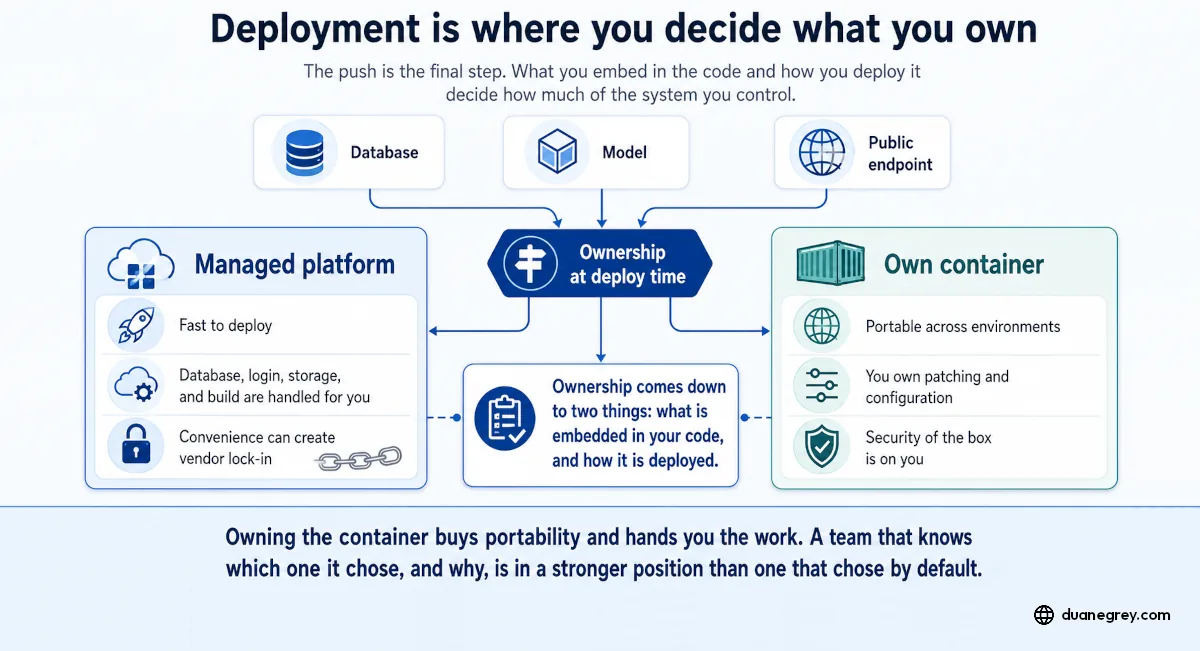
Deploying an app takes an afternoon now, but how it is deployed decides whether you can move later. Managed rails stand up fast and are hard to leave; an owned container costs more upfront work and runs anywhere. Know which trade you made on purpose, not by default.
Standing up an application used to take a team. One person can push a database, a model, and a public endpoint in an afternoon now, faster than at any point before. The push is the final step. The choices that came before it decide how much of what you built you control.
Ownership at deploy time comes down to two things. What is embedded in your code, and how it is deployed. Together they decide whether you can move later, or whether you have to change your design, refactor and rebuild your project.
What Gets Embedded Without You Noticing
When a platform makes deployment easy, it does it by handling the foundational parts in your code such as the database, login, storage, and the build step itself. This is convenient on day one, but has implications the day you try to leave.
By then your code assumes that provider's database, calls their login, and builds with steps tied to their pipeline. That coupling is easy to miss while you are building. You feel it when you start pricing out a move, usually to cut costs or scale for more users.
This is how you get locked into a vendor. It rarely gets chosen on purpose, more the outcome of a series of default decisions made for convenience.
Two Ways to Ship the Same Application
Managed rails are the platform path. You connect a repository, the platform builds and runs it, and the services around your code stay theirs. It is fast to stand up and easy to operate, but hard to leave, because the application is shaped around services you do not control.
A container is the other path. A container is a single package that holds your application and everything it needs to run, so the same package behaves the same way on your laptop, a rented server, or a different provider. You own it, and you can move it.
The honest difference is upfront work. The container takes more setup before anything runs. You define the environment, wire the services yourself, and take on the work the platform would have handled for you.
Why I Build the Container
I run my applications in a container with my own database. I build it that way because I want the option to leave, and I want the thing I tested to be the thing that runs.
Portability is the first reason. The package that runs on my machine runs on the server without a translation step. When a provider raises prices or changes terms, moving is a deploy instead of a rebuild.
Reproducibility is the second. The environment is written down and kept under version control, so there is no guessing about what is installed where. A problem in production can be recreated on my machine, because they are the same environment by construction.
Owning the container means taking on real work. I manage the infrastructure the platform would have managed. The patching and the security of what I stand up are mine now. The convenience I gave up became my job.
Some of that convenience still tempts me, and storing user images is the clearest case. Handing uploads to a managed service would save real work. What that service meters and charges for, and who owns the mistakes, are implications of my decisions, and I take them up in a companion piece on the stack your AI picks for you.
Owning It Comes With a Learning Curve
Owning the container means learning to run it. What surprises people is that what runs on your desktop is not guaranteed to run inside it. A library that works on your machine can behave differently under Linux and need swapping for one that does. The Python version on your machine has to match the one the container runs, or code that ran fine locally breaks in ways that do not point at the cause. Environment variables have to be injected and present the moment it starts, and a missing one can fail quietly.
Networking is the other challenge to resolve. Getting your application to reach its database, whether that database sits in a second container or outside on its own, runs over the bridge network that Docker gives containers to reach each other and the outside. Until that path is right, the application starts and then cannot find its data.
This is learnable, and you are not learning it alone. A model like Claude, Codex, or Gemini will read a log and tell you what the error means. The loop is clumsy, since you are taking screenshots or pasting log lines into a chat, but the effort to understand a container problem now is far lower than working it out from documentation by yourself.
I have found a handful of commands help with troubleshooting initial issues. These are the ones I reach for first:
# Check the container can reach an outside Postgres database
docker run -it --rm --network host postgres psql "postgresql://<user_name>:<password>@<ip_address>:5432/<database_name>"

# Show the environment variables set inside a container
docker exec <container-name> env

# Follow a container's logs as they happen
docker logs -f <container-name>

# List the Docker networks
docker network list

# Inspect one network in detail
docker network inspect <network-name>
Why You Might Choose the Other Way
Owning the deployment means owning the responsibility that comes with it. The conversation about not getting locked into a vendor can leave this part out.
When you run your own container, you own the patching and the configuration that keeps a port from being left open. The security of the box is on you, not a vendor. A managed platform does that work for you, and for many teams that is the right trade. A small team shipping its first product is right to take it. So is a project where speed matters more than the option to move, or where the data is not sensitive enough to justify the overhead.
The decision is which trade you are making on purpose. Renting the rails buys speed and hands off the work of running it. Owning the container buys portability and hands you that work. A team that knows which one it chose, and why, is in a stronger position than one that chose by default.
A Checklist for Either Path
Before committing a project to a way of deploying, these questions are worth answering. They hold whether you use managed rails, or deploy your own container on a server you manage or in the cloud.
- To leave this provider, would you move the same container somewhere else, or rebuild around a new database and storage?
- What in your code assumes one provider? The database it connects to, the login it calls, the place it stores images. Each is something you would have to re-home.
- Who patches the system your application runs on? On managed rails the provider does it. In your own container, that cadence is yours, and you need to know when a patch is due.
- If your data is sensitive, have you taken the appropriate steps to secure it within your application? An app that handles medical or personal records should be treated differently than a hobby project.
These questions push you to decide your application infrastructure and strategy deliberately. They highlight the tradeoffs before they become an invoice, a migration, or an incident.
What Did Not Move
The barrier to building collapsed. The security, infrastructure, maintenance, and deployment considerations stayed the same. Owning what you deploy takes the same work it took before, and it carries responsibility a managed platform would otherwise assume.
You can ship in an afternoon. Just understand the underlying choices that made it possible.
When you deployed your last project, did you choose how much of it you owned, or did the platform choose for you?

Written by Duane Grey
AI Strategy & Implementation
Independent AI consultant helping companies cut through hype and deploy systems that produce real results.