What does it take to run a local AI assistant on consumer hardware?
Find this useful? Share the visual.
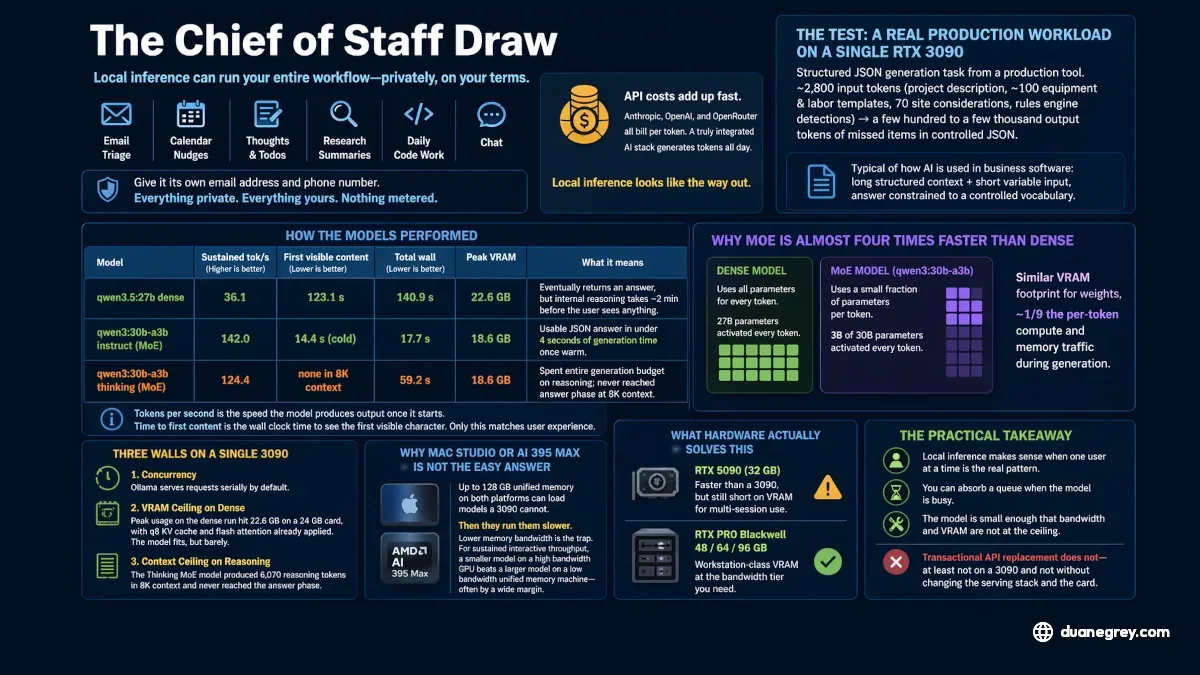
The Short Version
A single consumer GPU runs one model for one user at a time. The moment you ask it to serve concurrent requests across email, calendar, chat, and code, you hit the gap between 'it runs' and 'it serves.' The constraint is rarely the model. It is memory bandwidth, VRAM headroom, and concurrency, and consumer cards have limited budget for any of the three. On an RTX 3090, a 30 billion parameter mixture of experts model produces JSON answers in under four seconds, while a dense 27 billion parameter model takes over two minutes. Local inference works for low concurrency workloads. Transactional API replacement at scale needs workstation generation hardware.
A single consumer GPU will run one model for one user at a time. The moment you ask it to behave like an actual assistant, with concurrent requests across email, calendar, chat, and code, you hit the gap between "it runs" and "it serves." That gap is rarely the model. It is the hardware budget for memory bandwidth, VRAM headroom, and concurrency, and consumer cards do not have enough of any of the three to replace an API for transactional work.
The Chief of Staff Draw
The pitch is appealing. One local model that handles email triage, calendar nudges, a running list of thoughts and todos, research summaries, daily code work, and chat. Push it further and you give it its own email address and phone number. Everything private, everything yours, nothing metered.
The price tag for the API version of that life adds up fast. Anthropic, OpenAI, and OpenRouter each bill per token, and a stack that is genuinely woven into your day is one that is generating tokens all day. Local inference looks like the way out.
It is the way out for some workloads. It is not the way out for the ones that have to feel responsive while another request is already in flight.
What the "Free Claude Code" Videos Leave Out
There is a current of YouTube content built around running open coding agents like OpenClaw or Qwen Coder on local hardware as a free replacement for Claude Code. The framing is that you save the API bill and get the same experience.
The benchmark in those videos is typically single user, single prompt, single window. That is the cheapest test to film and the easiest to make look impressive. The metrics that matter for daily use are the ones that do not appear in the demo: time to first character of the response, throughput while a second request is already running, VRAM headroom as the conversation grows past trivial, and whether the model is reasoning silently for thirty seconds before producing anything visible.
Open coding agents are real software and they do real work. The video does not lie. It just measures the one condition where the local setup looks closest to the cloud one. Outside that condition, the gap shows up quickly.
The Test: A Real Production Workload on a Single RTX 3090
The test is a structured JSON generation task pulled from one of my own production tools. The model is given a project description, a catalog of about a hundred equipment and labor templates plus seventy site considerations, and a list of what a rules engine already detected, then asked to return JSON listing the items that were missed. Input is roughly 2,800 tokens, output is a few hundred to a few thousand depending on the model. The shape is typical of how AI is used inside business software today: long structured context plus a short variable user input, with the answer constrained to a controlled vocabulary.
I wanted to see whether I could move that workload, plus a chat assistant for duanegrey.com and a few personal automation scripts, off OpenRouter and onto a 3090 sitting idle on my Fedora server. I tested three Qwen models with the actual production system prompt at an 8,192 token context window. Context window is the maximum amount of input plus output the model can hold in working memory at one time. The Ollama configuration on the server already had two relevant flags on: q8 KV cache quantization, which stores the model's per token working memory in eight bit form to save VRAM, and flash attention, which makes attention math faster and lower memory.
Here is what came back.
- qwen3.5:27b (dense): 36.1 tok/s sustained, 123.1 s to first visible content, 140.9 s total wall, 22.6 GB peak VRAM.
- qwen3:30b-a3b instruct (MoE): 142.0 tok/s sustained, 14.4 s to first content from a cold start, 17.7 s total wall, 18.6 GB peak VRAM.
- qwen3:30b-a3b thinking (MoE): 124.4 tok/s sustained, no visible answer reached inside an 8K context, 59.2 s total wall, 18.6 GB peak VRAM.
Three models, three different stories. The Instruct variant of the mixture of experts model produced a usable JSON answer in under four seconds of generation time once the model was warm. The dense model produced an answer too, but it took roughly two minutes of internal reasoning the user does not see. The Thinking variant of the MoE model did not reach the answer phase at an 8,192 token context budget because it spent the entire generation budget on reasoning.
Tokens per second is the speed at which the model produces output once it starts. Time to first content is the wall clock between hitting send and seeing any visible character of the answer. The two are different measures, and the second one is what the user feels.
Why MoE Is Almost Four Times Faster Than Dense
A dense model uses each parameter for each token it generates. A 27 billion parameter dense model pulls 27 billion parameters from VRAM through the GPU compute units once for each token. A mixture of experts model holds the same total parameter count, but just a small fraction is active per token. The qwen3:30b-a3b model has 30 billion parameters total and 3 billion active per token. Similar VRAM footprint for the weights, roughly one ninth the per token compute and memory traffic during generation.
Memory bandwidth is the rate at which a GPU can move data from VRAM to its compute units, measured in gigabytes per second. It is the floor on how fast a model can run, because each token has to read parameter weights and KV cache out of memory and back. The 3090 has about 936 GB/s of memory bandwidth. With a dense 27B model at four bit quantization, each token reads roughly 14 GB worth of weights. At 936 GB/s, the theoretical ceiling is around 67 tokens per second, and we measured 36 with overhead. With a 3 billion active parameter MoE, each token reads roughly 1.5 GB and the bandwidth budget supports far higher throughput, which is exactly what showed up at 142 tokens per second.
This is the part most hardware comparisons skip. Throughput is bandwidth divided by per token data movement, and capacity is what fits at all. They are different problems with different solutions.
Three Walls on a Single 3090
After the test I had three separate findings, each independently sufficient to keep this workload on OpenRouter.
Concurrency. Older versions of Ollama served requests serially, and that constraint shaped the original conclusion. Recent Ollama parallelizes automatically when VRAM allows. Retesting the Instruct MoE at workers=1, 2, and 4 on the same 3090, throughput scaled to 1.86× and 2.14× the single stream baseline. Per request p50 latency moved from 4.5 seconds to 5.1 seconds at workers=2 and 8.9 seconds at workers=4. Schema validity stayed at 100 percent across each level and hallucination rate stayed at zero. For high concurrency transactional work vLLM is still the better serving stack, but two to three concurrent workloads on a single MoE model is no longer the impossible case.
VRAM ceiling on dense. Peak usage on the dense run came in at 22.6 GB on a 24 GB card, with q8 KV cache and flash attention already applied. The model fits, but barely. There is no headroom for a second concurrent KV cache, and not much room to grow context for a single user either. That ceiling is hard. It does not move with software tuning.
Context ceiling on reasoning. The Thinking variant of the MoE model produced 6,070 reasoning tokens in 8K context and did not reach the answer phase. Reasoning models trade output time for output quality. To make that trade work for a structured task you need a larger context window, and a larger context window means a larger KV cache, and a larger KV cache means more VRAM. A 24 GB card runs out of room before the reasoning model has space to think and answer.
Why a Mac Studio or AI 395 Max Is Not the Easy Answer
The instinct after hitting these walls is to look at unified memory machines. The Mac Studio with the M4 Max ships with up to 128 GB of unified memory. The AMD Ryzen AI Max 395 system on chip ships with up to 128 GB as well. Both can load models a 3090 cannot.
Then they run them slower. The Mac Studio with the M4 Max runs at 410 GB/s on the 14 core CPU and 32 core GPU configuration, or 546 GB/s on the 16 core CPU and 40 core GPU configuration. The AMD Ryzen AI Max 395 sits at 256 GB/s on a 256 bit LPDDR5X bus. The 3090's 936 GB/s is well above either of them. So you load a bigger model, and pay for it on each token. The throughput math does not care that the model fits if the path between memory and compute is narrower.
This is the trap that capacity oriented marketing exploits. A reader sees "runs 70B locally" and infers "runs 70B locally well." Memory bandwidth is the missing variable. For sustained interactive throughput, a smaller model on a high bandwidth GPU beats a larger model on a low bandwidth unified memory machine, often by a wide margin.
What Hardware Solves This
The concrete target is one dense model serving three production workloads at once. A structured generation call from a back office tool that returns JSON against a controlled vocabulary. A lead scoring call against a marketing site combined with a chat assistant on the same site grounded in retrieval augmented generation, where the model answers from a search across published content rather than from training data alone. A customer support chat that runs against a knowledge base. Each of those is its own session with its own KV cache, and at peak they overlap.
For a single dense model in the 27B to 30B class to handle that load, the practical floor sits at 48 GB of VRAM and Blackwell class memory bandwidth. The VRAM budget covers the model weights (around 17 GB at four bit quantization), four to six concurrent KV caches at the context lengths these workloads use, and a margin for spikes. The Blackwell requirement is about per token speed. KV cache and weight reads still traverse memory bandwidth on each token, and the older generation top out below where a dense model needs to be to feel responsive while serving multiple sessions at once.
The current consumer Blackwell card, the RTX 5090 at 32 GB, sits in the awkward middle. Faster than a 3090 but still short on VRAM for the multi session case. The professional Blackwell parts move you to 48, 64, or 96 GB at the bandwidth tier you want, and the cost moves with the capacity.
Running three production workloads against a single dense local model is not a consumer GPU project today. It is a workstation budget project with workstation generation hardware, or a project that selectively keeps some work local and routes the rest to APIs that already solved the concurrency problem.
Where I Ended Up
Everything transactional stays on OpenRouter. Each of the three production workloads runs through OpenRouter's qwen3.5-27b endpoint. The 3090 on Fedora is not running production traffic.
The one local use I am moving forward with is the chat assistant for this site using the MoE Instruct model. Chat is a low concurrency workload by nature, since the same person is rarely sending two questions at once. If the model is busy when a request lands, the user feels a brief wait and not a broken feature. That is the kind of workload that fits comfortably inside what a single 3090 can do, and it is the only one on my current list that does.
The Practical Takeaway
Local inference makes sense where one user at a time is the actual usage pattern, where you can absorb a queue when the model is busy, and where the model is small enough that bandwidth and VRAM are not pressed against the ceiling. Chat assistants, batch summarization, content drafting, and personal experimentation all fit. Transactional API replacement does not, at least not on a 3090 and not without changing the serving stack and the card together.
The "free local replacement for the Claude API" pitch is a useful reality check on the API bill. It is not a viable production architecture on consumer hardware. Knowing which side of that line your workload sits on saves you the hardware purchase that finds out for you.
By the Numbers
Mixture of experts language models such as Mixtral 8x7B activate only about 13 billion of their 47 billion total parameters per token, sharply reducing the per-token compute and memory traffic relative to a dense model of equivalent total size.
Jiang et al., 'Mixtral of Experts,' arXiv:2401.04088, 2024
Inference latency for transformer language models on commodity GPUs is bound primarily by memory bandwidth rather than compute, because each generated token requires reading the model parameters and KV cache from memory.
Pope et al., 'Efficiently Scaling Transformer Inference,' arXiv:2211.05102, 2022

Written by Duane Grey
AI Strategy & Implementation
Independent AI consultant helping companies cut through hype and deploy systems that produce real results.