What are the challenges of integrating AI into existing web development workflows?
Find this useful? Share the visual.
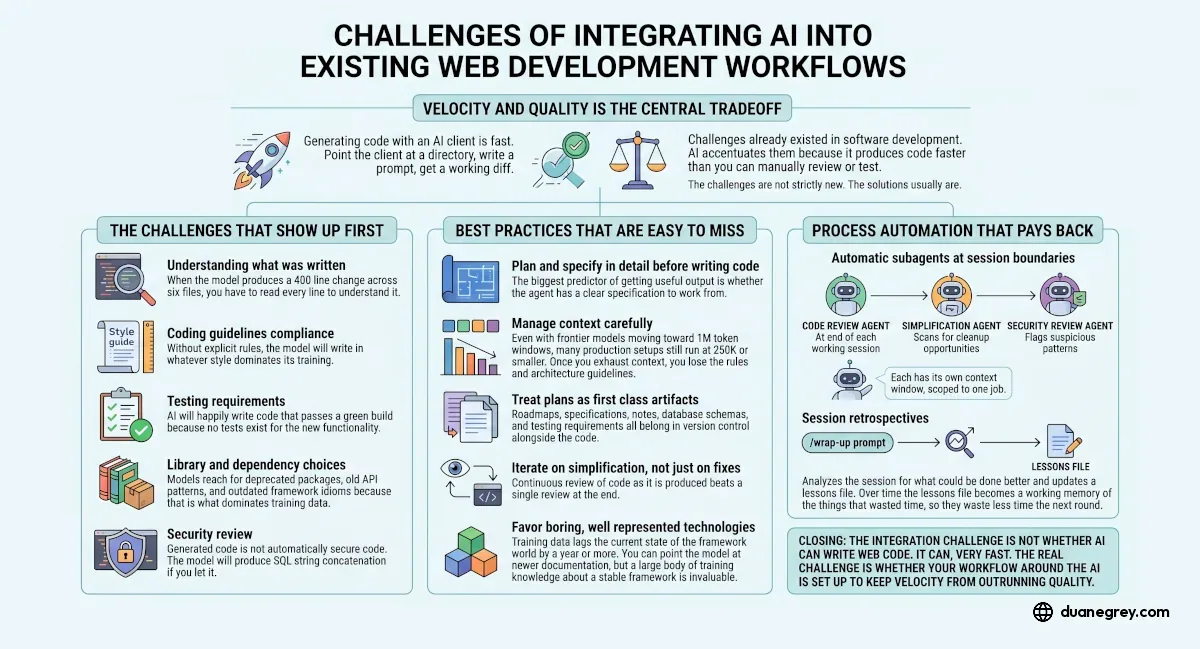
The Short Version
AI accelerates the production of code without automatically accelerating the planning, review, testing, or architecture decisions around it. The integration challenge is not whether AI can write web code (it can, very fast). It is whether your workflow can keep velocity from outrunning quality. Plan and specify in detail before writing. Manage context carefully so the agent does not lose track of decisions made earlier in the session. Treat plans, schemas, and rules as artifacts the agent can read directly. The biggest gains come from putting structure around the agent, not from picking a better model.
A useful answer starts with what a development workflow looks like once agents are in the loop. Most of the friction people hit when integrating AI into web development is not about whether the model can write code. The friction is about everything that surrounds writing code, like the planning, the review, the testing, the architecture decisions, and the cleanup. Agents accelerate the production side without automatically accelerating the rest.
This answer keeps the focus on the individual development workflow. Organizational changes around supporting an agentic team, and the coordination complexity that comes with multiple people sharing artifacts and branches, are real but separate topics. The challenges below show up even for a solo developer working with an AI client today.
One framing up front. The challenges below are not a zero sum game where no solutions exist. They are a balance of setup and process. If the bar for "successful integration" is only "can a developer install a coding client and point it at a model," there is no real challenge. Install Claude Code or Cursor, configure the provider, write a prompt. Done. The harder bar is whether the code that comes out meets the same standards you would hold for code written by hand, and whether you can keep up with reviewing it.
Enterprise Context First
Before the workflow challenges, enterprise environments add a layer that does not apply universally. The organization has to provision an account. IT controls when the client updates and which version you are on. Network security may require proxy configuration. Some companies restrict which models you can call, or require you to route through an internal gateway. These hurdles are real but specific to where you work, not to AI integration in general. Once you are past them, the workflow challenges below apply the same.
Velocity and Quality Is the Central Tradeoff
Generating code with an AI client is fast. Point the client at a directory, write a prompt, get a working diff. The difficulty is that most of the challenges that already existed in software development are still there. AI accentuates them because it produces code faster than you can manually review or test. The challenges are not strictly new. The solutions usually are.
The Challenges That Show Up First
Understanding what was written. When the model produces a 400 line change across six files, you have to read every line to understand it. If you skip that step because the tests pass, you accumulate code in the project that nobody on the team, including you, understands. Six months later when something breaks, you are debugging code you wrote but never read.
Coding guidelines compliance. Without explicit rules, the model will write in whatever style dominates its training. Inconsistent logging, exception handling that does not match your conventions, naming that drifts from the rest of the codebase. The fix is rules and guidelines that the agent can read, not assumptions that it will infer your style from context.
Testing requirements. AI will happily write code that passes a green build because no coverage exists for the new functionality. Defining what counts as tested before the code is written, and verifying against those requirements, is a discipline. Without it you end up with high coverage numbers and low confidence in what they mean.
Library and dependency choices. Models reach for deprecated packages, old API patterns, and outdated framework idioms because that is what dominates training data. A model trained primarily on code from 2023 will write 2023 code in 2026. You either correct it manually, point it at current documentation, or restrict the choices in your project rules.
Security review. Generated code is not automatically secure code. The model will produce SQL string concatenation if you let it. It will skip input validation. It will store credentials in ways that look fine in isolation. Without a deliberate security review step, vulnerabilities accumulate.
Best Practices That Are Easy to Miss
Plan and specify in detail before writing code. The biggest predictor of getting useful output is whether the agent has a clear specification to work from. A vague prompt produces vague code that needs three rounds of revision. A detailed plan produces code that is closer to right on the first try.
Manage context carefully. Even with frontier models moving toward 1M token windows, many production setups still run at 250K or smaller. Once you exhaust context, you lose the rules, the architecture guidelines, and the understanding of how the current change fits into the larger effort. The model starts giving you locally correct answers that conflict with decisions made earlier in the session.
Optimize for agent legibility. Specifications, design decisions, and conventions belong in markdown or a similar plain text form the agent can read directly. A design captured in a Figma comment thread or a Slack message is invisible to the agent. A decision captured in a markdown file in the repo gets pulled into context automatically.
Treat plans as first class artifacts. Roadmaps, specifications, notes, database schemas, and testing requirements belong in version control alongside the code. When the model can read your schema file, it stops inventing column names. When it can read your roadmap, it stops suggesting features that contradict it.
Iterate on simplification, not just on fixes. Continuous review of code as it is produced beats a single review at the end. AI tends to focus on the immediate fix unless explicitly prompted to step back and re-evaluate the implementation path. A simplification pass after each working change catches the dead code, the unnecessary abstraction, and the place where the same logic was duplicated three files over.
Favor boring, well represented technologies. Training data lags the current state of the framework world by a year or more. You can point the model at newer documentation, but a large body of training knowledge about a stable stack is invaluable. Stable, composable, well documented stacks produce better generated code than the latest framework that has six months of public examples.
Thinking models are better but cost more tokens. Reasoning models tend to return higher quality code, especially for complex changes. They also burn through tokens faster. The decision of when to use a thinking model vs a faster cheaper one is a workflow choice, not a default.
Set up rules per framework and language. A rule file that says "use parameterized queries, never string formatting in SQL" applies in any project that touches a database. Boundary logging conventions, exception handling shape, test patterns. These belong in rules the agent loads automatically.
Slash commands for repeatable work. End of session wrapup, security review, simplification pass. Anything you do more than twice belongs in a slash command. The cognitive cost of remembering to run it drops to near zero.
Write testing docs first and verify against them. The agent must have a way to verify its own work. That means tests that fail when the code is wrong and pass when the code is right, before the code exists. Without this, the agent will declare success when the build is green and the feature is broken.
Walk through the site in a real browser. For frontend work, Playwright tests are necessary but not sufficient. A real browser session catches the things automated tests miss, like layout regressions, focus order, and the click that does not feel right. The AI cannot do this for you.
Process Automation That Pays Back
Two kinds of automation tend to pay back the time spent setting them up.
Automatic subagents at session boundaries. A code review agent that runs at the end of each working session. A simplification agent that scans for cleanup opportunities. A security review agent that flags suspicious patterns. Each has its own context window, scoped to one job.
Session retrospectives. A wrapup prompt that analyzes the session for what could be done better and updates a lessons file. Over time the lessons file becomes a working memory of what wasted hours before, so it wastes fewer the next round.
The Claude Specific Layered Setup
Claude Code structures the agent's persistent state in four layers, and matching your workflow to them avoids fighting the tool.
Layer one is memory. One file called CLAUDE.md at the project root. It remembers tech stack, design rules, and workflow preferences across sessions. Without it, the agent starts from scratch in new conversations.
Layer two is skills. Markdown files that auto trigger based on the current task. Testing work loads testing patterns. Deployment work loads deploy steps. No prompting needed because the right context gets pulled automatically.
Layer three is hooks. Safety gates that fire every time, not as suggestions but as enforced rules. CLAUDE.md instructions get followed maybe 70% of the time. Hooks get followed close to 100%. That gap is the difference between "it usually works" and "it always works."
Layer four is agents. Subagents with their own context windows, each scoped to a single job. One handles code review, another handles security, a third runs tests. They do not compete for the main context window because they are not in it.
What People Miss in This Conversation
A few things that rarely come up but matter once you have been in the workflow for a few months.
Model drift over the life of a project. The version you started the project with is not the version you are using six months in. Claude 4.5 became 4.6 became 4.7. Behavior shifts. Code style changes. The decisions you locked in early may need revisiting because the agent now does things differently. Pinning to a specific version where reproducibility matters is a real choice.
Cost observability. Token spend per session is invisible until you look. A long debugging session with a thinking model can burn through a meaningful fraction of a monthly budget without warning. Knowing what a session cost, and what produced the cost, is the prerequisite for the conversation about optimization.
Diff review fatigue. Even solo, reviewing a 600 line generated diff every hour is exhausting. The volume of code an agent produces outpaces the volume a human can carefully read. Smaller, more frequent commits with focused diffs reduce fatigue more than any other change.
Verification of non code artifacts. The same agent that writes code also writes specs, schemas, documentation, and migration plans. These are harder to verify because there is no test suite for a spec. Building review loops for the non code outputs (read it aloud, check it against the system you built, ask a second agent to critique it) is its own discipline.
Prompt and session reproducibility. The same prompt against the same model on two different days can produce two different results. For experimentation that is fine. For a process you intend to repeat, you need either deterministic prompts that give the same shape of output every time, or session logs you can reference when the output drifts.
Branching and worktree coordination, even solo. Running multiple agents in parallel against the same repo, even on a single machine, creates merge conflicts and stepped on changes. Worktrees give each agent its own working copy. Without them, two agents touching the same file at the same time produce a mess that is faster to redo than to untangle.
Closing
The integration challenge is not whether AI can write web code. It can, very fast. The real challenge is whether your workflow around the AI is set up to keep velocity from outrunning quality. Most of the items above are solvable with deliberate setup. The developers who get the most value treat the agent as a powerful collaborator that needs explicit context, clear rules, and verification at every boundary, not a magic box that makes engineering go away.
What part of your workflow do you think would feel different a year from now?
By the Numbers
76% of developers reported using or planning to use AI tools in their development process in 2024, up from 70% in 2023.
Stack Overflow 2024 Developer Survey
Teams adopting AI tools saw a 25% increase in AI use over the prior year, with measured tradeoffs between throughput gains and delivery stability that vary by how the tools are integrated.
Google DORA 2024 Accelerate State of DevOps Report

Written by Duane Grey
AI Strategy & Implementation
Independent AI consultant helping companies cut through hype and deploy systems that produce real results.