I Built a Lead Pipeline That Costs Almost Nothing to Run
I Built a Lead Pipeline That Costs Almost Nothing to Run
Solo consultants live and die by their pipeline. That is not an exaggeration. You can be the most skilled person in your field, but if leads cool off while sitting in your inbox, none of that skill matters. I learned this the hard way during the beginning of my own AI and automation consulting practice. I had a good month of inbound interest, but my close rate was terrible. Not because my proposals were weak, and not because my pricing was off. It was because I was slow.
Research backs this up. Somewhere between 35% and 50% of deals go to whoever responds first. Not whoever has the best portfolio. Not whoever has the lowest price. Whoever picks up the phone, sends the email, gets back to the prospect while the pain is still fresh.
I was not that person. I was busy doing delivery work, and leads would sit in my inbox for hours. Sometimes a full day. By the time I responded, they had already talked to two other consultants. Worse, I had no system for distinguishing a hot prospect from a casual browser. Every inquiry got the same treatment, whenever I got around to it.
Follow-ups were even worse. I wanted to start providing value immediately, whether or not someone became a customer. But that was impossible when I was heads-down on delivery work.
So I built a system to solve it. The whole thing runs on tools I already had, costs nothing per month, and handles everything from first contact to call prep. Here is exactly how it works and what I learned building it.
The Core Principle: No Dead Air
Before I wrote a single line of code, I established one rule: no lead should ever go 48 hours without hearing from me. I call this the "No Dead Air" principle. In radio, dead air is silence that makes listeners change the station. In sales, dead air is silence that makes prospects move on.
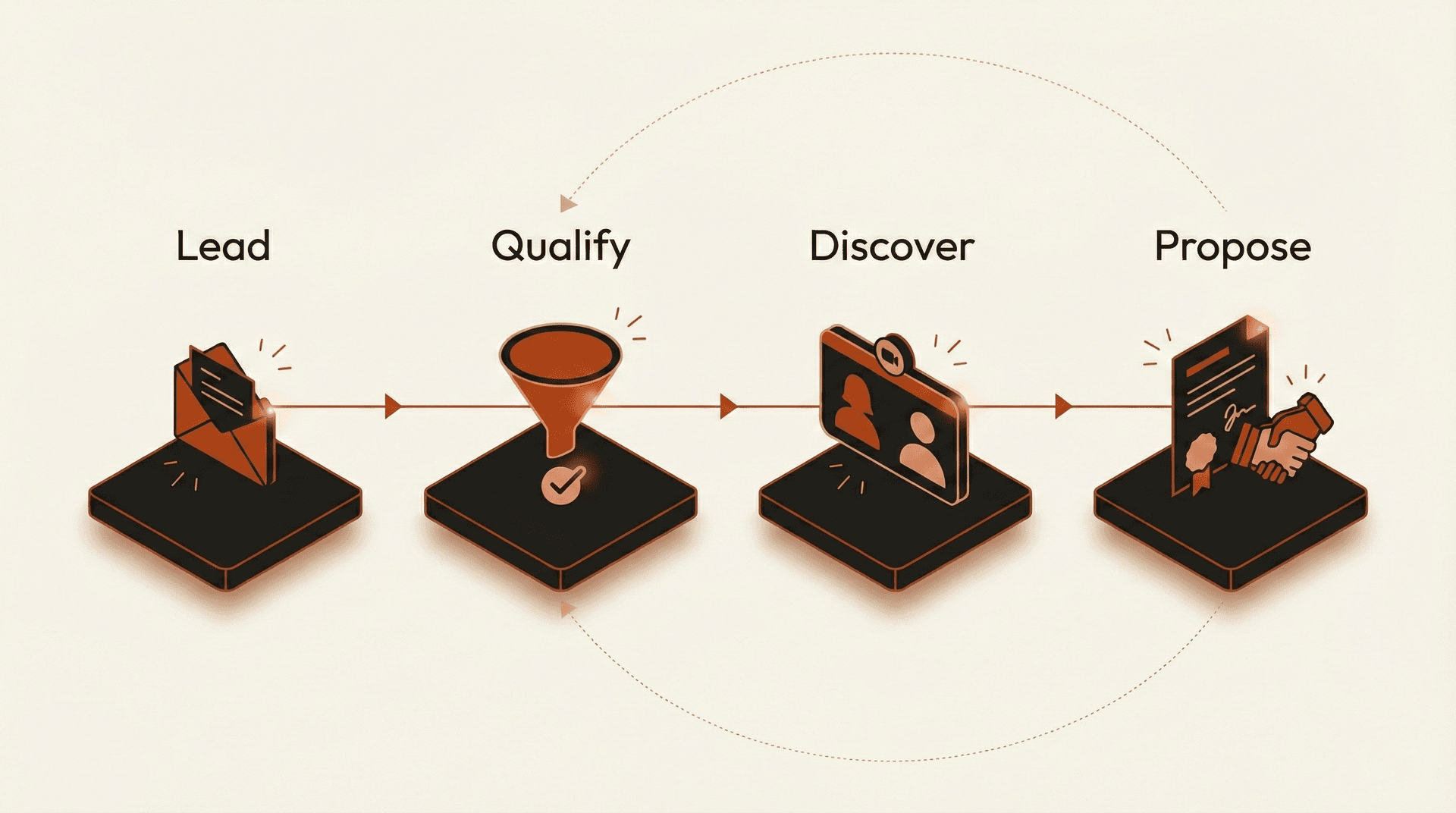
Most solo consultants think about their pipeline in terms of stages: lead, qualified, proposal, close. That is fine for reporting, but it misses the real problem. The real problem is the gaps between those stages. The silence after the first email. The two days between a discovery call and a follow-up. The week between a proposal and a check-in.
Those gaps are where deals die. My entire system is designed to fill them.
AI Pain Scoring: Why Budget Questions Are the Wrong Filter
The first thing most qualification frameworks ask about is budget. BANT (Budget, Authority, Need, Timeline) has been around since the 1960s, and budget is literally the first letter. I think that is backwards, at least for solo consulting.
Here is what I have observed over engagements: a prospect with a $2,000 budget and a burning problem closes faster and more reliably than a prospect with $10,000 and a vague aspiration. Pain is the real signal. Budget follows pain.
So I built a pain-based scoring system using Gemini. Fast and cost-effective per analysis. The model reads the free-text message from the contact form and scores it across three dimensions:
- Cost evidence -- Is there language suggesting the problem is already costing them money? Things like "we're losing," "it takes our team X hours," or "we had to hire a contractor" all score high.
- Failed attempts -- Have they already tried to solve this and failed? "We looked at Zapier but it could not handle..." or "our developer built something but it breaks constantly" indicate real urgency.
- Time pressure -- Are there deadlines, events, or external forces creating urgency? "Before Q3," "our contract expires in April," or "the board is asking" all push the score up.
The model returns a score from 1 to 10 along with a short summary of what it found. A score of 7 or above means this person has a real problem, has likely tried to fix it, and has a reason to act now. Those leads get prioritized immediately.
This runs through Gemini's API. The scoring takes about two to three seconds per lead and costs fractions of a cent. For the volume I handle as a solo consultant, that is more than fast enough and effectively free.
The System: From Contact Form to Call Prep
Let me walk through the full pipeline, step by step.
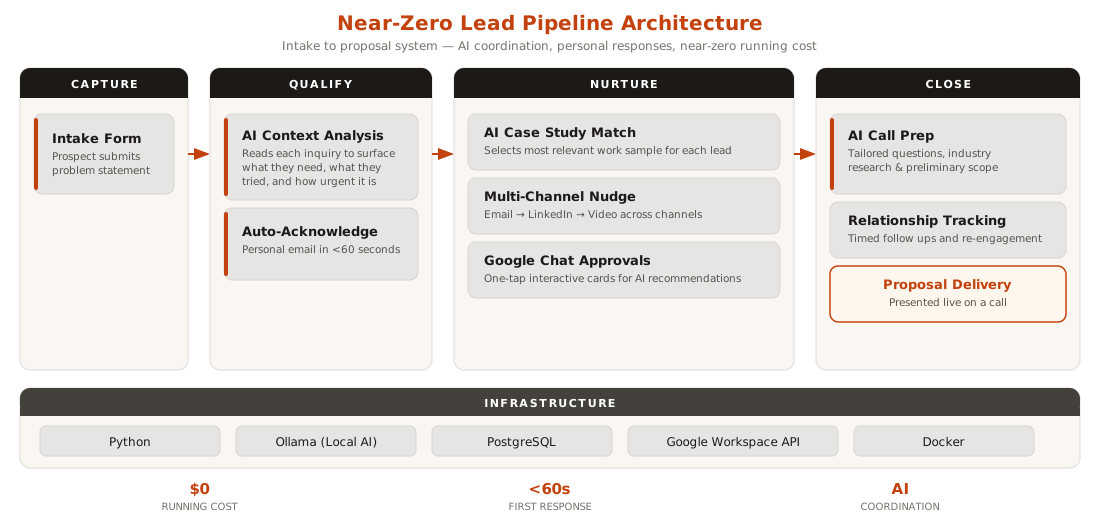
Step 1: Auto-Acknowledge (<60 seconds)
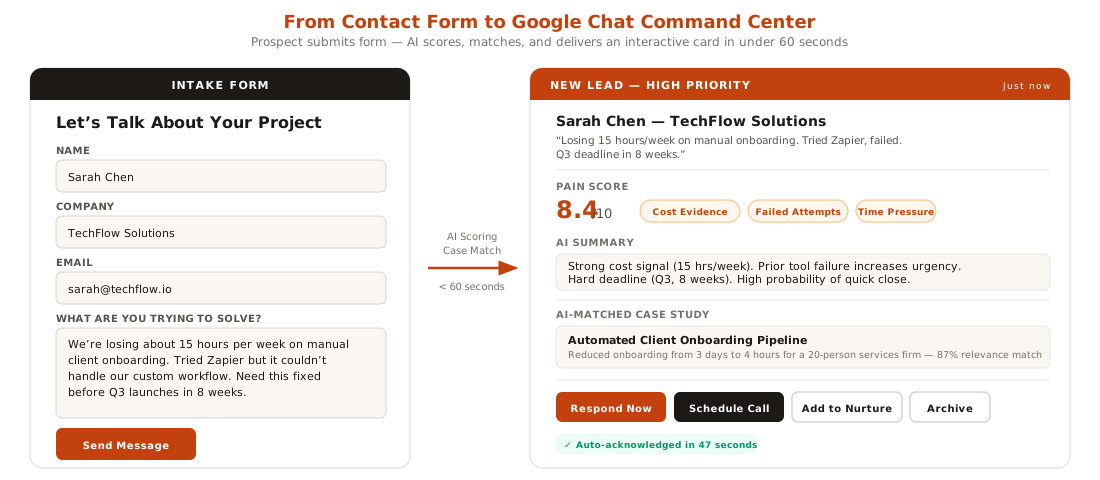
When someone submits my contact form, the system sends a personalized acknowledgment email in under 60 seconds. Not a generic "we received your message" autoresponder. The email references their name, mentions the type of work they described, and sets an expectation: "I will personally review your message and respond within a few hours."
This does two things. First, it confirms I am real and responsive. Second, it buys me time to do the actual qualification without the prospect wondering if their message went into a void.
Step 2: AI Pain Scoring
Simultaneously, the system runs the pain scoring analysis I described above. The lead gets a score, a summary, and a recommended priority level. All of this lands in my Google Chat space within seconds of the form submission.
Step 3: AI Case Study Matching
This is one of my favorite parts. The system maintains a small database of my past projects with descriptions, outcomes, and the types of problems they solved. The AI reads the incoming lead's message and selects the one or two case studies most relevant to their situation.
If someone writes about needing help automating their client onboarding, the system picks my case study about building an automated onboarding pipeline. If they mention data extraction from documents, it surfaces my work on document processing automation.
This match gets packaged into a follow-up email that goes out 2 to 6 hours after my personal response. The timing is deliberate. It fills the dead air between my initial reply and whatever comes next, and it gives the prospect something concrete to evaluate. Not a generic portfolio link, but a specific, relevant example of work I have done that maps to their problem.
Step 4: Google Chat Interactive Cards
I made a deliberate decision early on: Google Chat is my command center, not email. Email is for prospects. Google Chat is for me.
Every lead that comes in generates an interactive card in my dedicated pipeline Chat space. The card shows the prospect's name, their message summary, the pain score, the matched case studies, and a set of one-tap action buttons: Respond Now, Schedule Call, Add to Nurture, or Archive.
This means I can triage my entire pipeline from my phone while waiting for coffee. No logging into a CRM, no opening spreadsheets, no context switching. One tap and the system executes the next step.
Step 5: Multi-Channel Nudge Sequence
If a prospect goes quiet after my initial response and the case study follow-up, the system does not just send more emails. It switches channels and content type.
The sequence works like this: after the initial email exchange, if there is no response within three days, the system drafts information referencing their inquiry and tries to provide some lessons learned and tips. It says "I am trying to reach you because I think I can actually help".
I do not fully automate the outreach. The system drafts the messages and queues them for my approval through Google Chat cards. One tap to send the communication. One tap to get the video script and a reminder to record it. The AI does the thinking and writing; I do the sending.
Step 6: AI Call Prep
When a lead converts to a scheduled call, the system goes to work again. It generates a call prep document that includes:
- Tailored discovery questions based on what the prospect described in their initial message
- Background research pulled from their company website and internet available information
- A preliminary scope outline suggesting what kind of engagement might fit
- Pricing context from similar past projects
I used to spend 20 to 30 minutes prepping for each discovery call. Now the AI gives me a solid starting point in seconds, and I spend 5 to 10 minutes refining it. That time savings compounds when you have multiple calls in a week.
Step 7: Warm Shelf Management
Not every lead is ready to buy right now. Some are researching. Some have budget cycles. Some need internal approval. These leads go on what I call the "warm shelf."
The system tracks warm shelf leads and triggers re-engagement at sensible intervals. If someone told me they were evaluating options for Q3, the system queues a check-in for six weeks before Q3 starts. If someone said they needed board approval, it follows up in four weeks asking how the conversation went.
These are not drip campaigns. They are timed, contextual touches based on information the prospect actually shared with me. The AI drafts each message referencing the original conversation, and I approve it through Google Chat before it sends.
The Tech Stack
Everything runs on tools that are either free or that I was already paying for:
- Python -- All the orchestration logic, API integrations, and automation workflows
- Gemini -- AI model for pain scoring, case study matching, and message drafting
- PostgreSQL -- Lead tracking, pipeline state, case study database, and warm shelf schedules
- Google Workspace API -- Gmail for sending, Google Chat for the command center, Calendar for scheduling
- Docker -- The whole system runs in containers on my workstation
Monthly cost: effectively $0. I already pay for Google Workspace, Gemini API costs are negligible at my volume, PostgreSQL is free, Docker is free, and Python is free.
There is no SaaS subscription, no per-seat CRM license, no expensive platform. The pipeline runs on my own infrastructure with minimal overhead.
The Results
Since launching the system, here is what changed:
- First response time went from hours to under 60 seconds. Every lead gets an acknowledgment almost instantly. My personal response typically follows within one to three hours, but the prospect never experiences silence.
- Zero dropped follow-ups. Before this system, I would estimate I lost two to three qualified leads per quarter simply because I forgot to follow up. That number is now zero. The system does not forget.
- Monthly running cost: near $0. I track this because it matters. As a solo consultant, every subscription is overhead that eats into margins. This system adds almost nothing to my monthly expenses.
- Higher quality discovery calls. The AI call prep means I walk into every call already understanding the prospect's situation. I ask better questions, I waste less of their time, and I can sketch a solution approach faster.
I do not have a clean A/B test comparing my close rate before and after. What I can say is that the combination of faster response times, zero dropped follow-ups, and better-prepared calls has noticeably improved my pipeline throughput. I close more of the leads I get, and I get them to a decision faster.
Three Lessons Worth Sharing
1. Pain scoring beats budget scoring.
If you build any kind of lead qualification, score for pain first. A prospect who describes a specific problem, has tried to fix it, and has a deadline will close faster than someone with a big budget and a vague sense that they "should probably do something with AI." Budget matters, but pain predicts action.
2. Fill the dead air.
The automated case study email that goes out 2 to 6 hours after my personal response is the single highest-impact piece of this system. It keeps momentum alive during the most fragile part of the sales process: the gap between first contact and real engagement. The prospect is still thinking about their problem, still comparing options, and they get a relevant, valuable piece of content from me without my having to remember to send it.
3. Switch channels when silence speaks.
After three emails with no response, sending a fourth email is just noise. Switching to another communication channel or a short video message changes the dynamic entirely. It demonstrates effort and genuine interest. Some of my best engagements started with a prospect who ignored two emails and then responded to a change in content or channel.
What I Would Build Differently
If I were starting over, I would add two things from day one.
First, I would build a simple analytics dashboard tracking conversion rates at each stage. Right now I can query the database manually, but having a visual pipeline would help me spot bottlenecks faster.
Second, I would integrate calendar booking directly into the acknowledgment flow. Right now there is a manual step where I send a scheduling link. Making that automatic for high-scoring leads would shave another day off the cycle.
The Bigger Point
This is not really an article about lead management software. It is about what becomes possible when you treat your own business processes with the same seriousness you treat client work.
As consultants, we build systems for other people all day. We automate their workflows, streamline their operations, and measure their results. Then we go home and manage our own pipeline with sticky notes and good intentions.
The tools to build something better are sitting right there. Python, a local AI model, a database, and the APIs you already have access to. No monthly fee required. No vendor to evaluate. Just a weekend of building and a willingness to treat yourself like your own best client.
The pipeline I built is not complicated. It is not even particularly clever. It is just thorough. It fills every gap where a lead might go cold, it gives me the information I need when I need it, and it costs nothing to run.
If you are a solo consultant losing deals to slower follow-ups and forgotten prospects, you do not need a $200/month CRM. You need a system that matches how you actually work. Build one.
Want to Discuss This?
Let's connect and explore how AI can work for your business.
Start a Conversation