Building an MVP with AI Tools: The Complete Workflow
Building an MVP with AI Tools: The Complete Workflow
There is no shortage of people talking about building with AI. Most of the content falls into two camps: either breathless enthusiasm about how AI will write your entire app for you, or dismissive skepticism from people who have not actually shipped anything with these tools. The reality is somewhere in the middle, and it is more interesting than either extreme.
I have built multiple production systems with AI tools over the past year. A lead pipeline with AI scoring and nurture across multiple channels that costs nothing to run. A daily business intelligence report system. A quoting platform for low voltage professionals. Each project taught me something about where AI tools accelerate real work and where they quietly waste your time if you are not careful.
This is the workflow I actually use to go from idea to working MVP. Not theory or what I think might work. This is the process that gets a prototype into production.
Step 1: Validate the Idea Before Writing a Single Line of Code
The most expensive mistake in building software is building the wrong thing. AI tools have made this easier to avoid, but only if you use them for research before you start coding.
Here is what I do before I open an editor:
Market research with AI chat. I use Claude or a local model through Ollama to analyze the competitive landscape. Not just "who else does this" but "what specific problems are people complaining about that existing tools do not solve." I feed it forum posts, reviews, and support threads from competitors. The AI is good at synthesizing patterns across large amounts of unstructured text.
Assumption stress-testing. I write out my core assumptions as plain statements and ask the AI to argue against each one. "This product assumes small businesses will pay $50/month for automated reporting." Then I ask it to find evidence both for and against that assumption. This is not a substitute for talking to real people, but it compresses the initial research phase from days to hours.
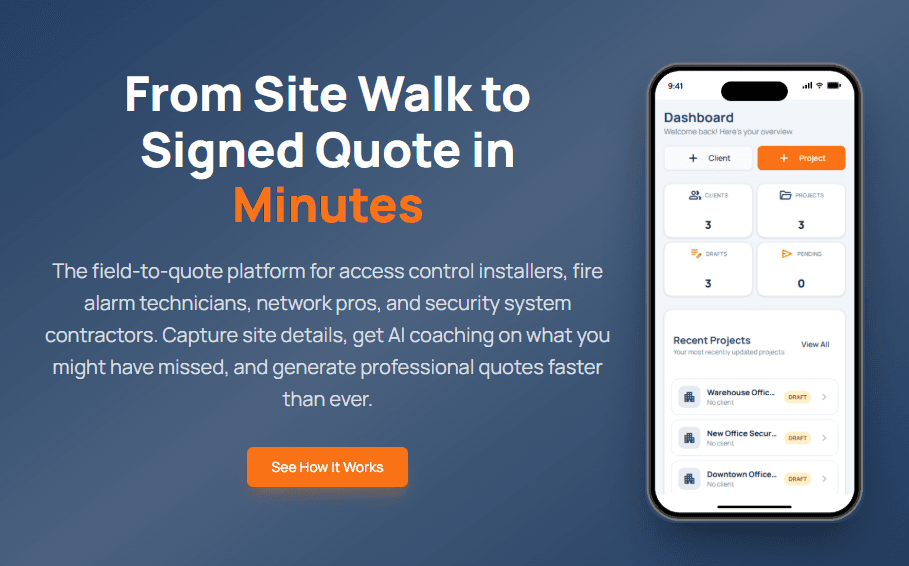
Scope definition. I ask the AI to help me define what the smallest working version looks like. What is the one thing this product must do on day one? Everything else goes on a "later" list. For ModProjectPro, the core was describing a job scope and having an expert system surface line items the contractor missed. Everything around project management, client tracking, and document generation came after the core quoting workflow worked.
The key here is discipline. AI makes it easy to explore endless possibilities. Your job is to constrain the exploration to what actually matters for a first version.
Step 2: Establish the Brand Before You Design Anything
This is a step most developers skip entirely, and it costs them later. Before you prototype a single screen, you need a brand identity. Colors, typography, voice, and tone. Without this, you end up with a prototype that looks generic, and then you spend weeks retrofitting a visual identity onto something that was never designed to have one.
I built a tool called Brand Forge specifically to solve this problem. It is a guided walkthrough that takes you from "I have an idea" to a complete, documented brand system in a single session. The wizard walks through six phases: what the brand does and what makes it different, who the audience is, the personality traits you want to project, industry context, and visual preferences like color temperature and font style.
The output is not a vague mood board. Brand Forge generates a complete brand package: a structured brand.json with every color, font, and voice decision documented, plus a design spec built for developers with CSS custom properties, Tailwind config snippets, type scales, spacing tokens, and component styles ready to paste into code. It also produces a visual brand board as a standalone HTML file and a full voice and tone guide with writing rules, words to use and avoid, and tone examples for different contexts.
The algorithm generates three brand directions, each varying how far it departs from industry conventions. You pick one, refine it with live sliders for accent color, temperature, and font pairing, and the entire package writes to disk. If you have a local AI model running through Ollama, it enhances the output with positioning statements, personality definitions, and context-specific tone examples.
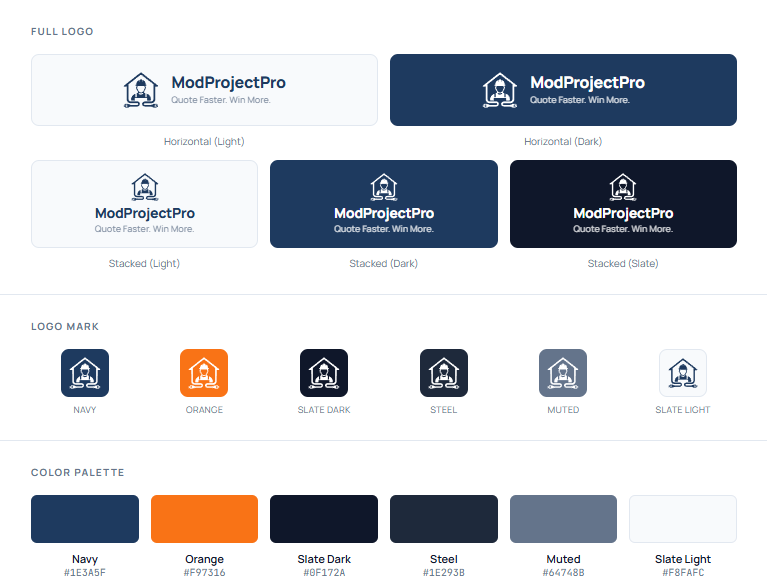
For the Duane Grey brand, the wizard produced the "Warm Authority" palette: charcoal primary, terracotta accent, cream backgrounds, Outfit for headings and Plus Jakarta Sans for body text. That single session produced the design system that now drives every page, component, and piece of content across the site. The logo is the one thing you bring yourself. Everything else comes from the wizard.
This step takes about 30 minutes. It saves weeks of design indecision later.
Step 3: Prototype Fast with Google Stitch, Then Present for Agreement
With the brand identity locked in, the next step is visual prototyping. This is where Google Stitch comes in. Stitch is a low-code tool that lets you build interactive mobile UI screens quickly. You can lay out real screens with real components and get a feel for the user flow without writing production code.
The speed matters, but the real value is what happens after you design the screens. Raw Stitch exports are inconsistent HTML scattered across folders. What clients and stakeholders need is something they can actually review and approve. That is where the Stitch Converter pipeline comes in.
I built this pipeline to solve a specific problem: taking those raw Stitch exports and turning them into a professional client deliverable. The pipeline does four things that matter:
Flattens and standardizes the exports. It takes the nested folder structure from Stitch, sanitizes the naming, and organizes everything into a clean file structure.
Generates framed screenshots. Every screen gets captured in two versions: a raw mobile screenshot at 360px width, and a version framed inside an iPhone 14 Pro mockup complete with the notch, side buttons, and status bar. The framed versions are what clients want to see. They make prototypes feel like a real product.
Builds a presentation deck. The pipeline groups screens by flow (quoting, projects, clients, etc.), generates section dividers, and produces an HTML slideshow that can be exported to PDF. Each slide shows the screen name on the left and the screenshot in an iPhone frame on the right. This is the artifact you walk through with a client.
Packages everything for delivery. An interactive HTML gallery with tab switching between framed and raw views, plus all the screenshots, the presentation, and the source HTML bundled into a timestamped ZIP.
For ModProjectPro, the pipeline processed 11 screens and produced 22 screenshots, a complete slide deck, and a client-ready package. Each project gets its own brand colors and fonts pulled from the brand configuration.
The brand work from Step 2 feeds directly into this step. The Stitch Converter reads brand colors and fonts from a config file, so every converted screen and every presentation slide uses your actual brand palette, not Stitch defaults. The output looks like your product, not a generic prototype.
This is the step where the client agrees to the direction. Once they sign off on the visual flow and the walkthrough of every screen, you build with confidence instead of guessing.
Step 4: Build the Roadmap Before You Build Anything
This is the step most people skip when they talk about building with AI, and it is the one that matters most. Before any code gets written, I spend one to two days with an AI assistant building a structured roadmap for the entire project.
The process starts with concept development. I describe the product vision, the user problems, and the constraints. Then the AI and I work through the full scope together, challenging assumptions, identifying dependencies, and figuring out what order things need to happen in. This is not a quick conversation. It is a working session that sometimes stretches across multiple days.
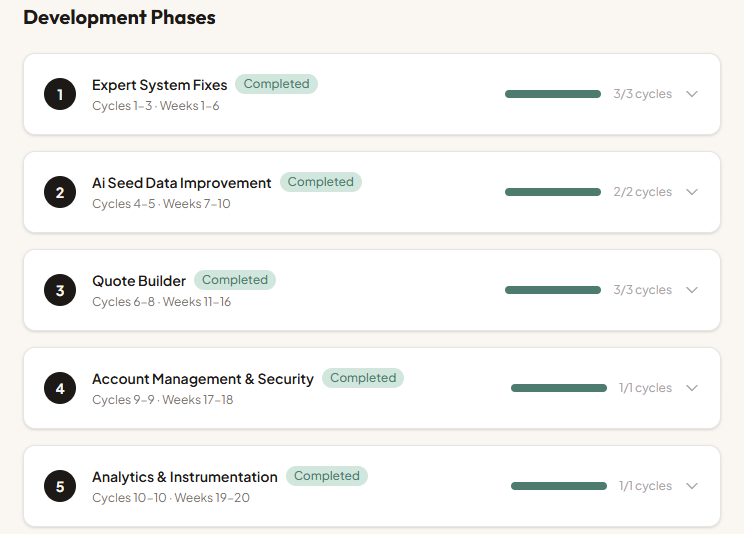
The output is a phased roadmap. Each phase represents a meaningful chunk of the product that can be built and tested independently. For ModProjectPro, Phase 1 was the core quoting workflow. Phase 2 was the expert system that catches missed line items. Phase 3 was client management and document export. Each phase stands on its own, and each one delivers value even if you stopped there.
Inside each phase, I break the work into development cycles. A cycle is typically one to two weeks of focused effort. Each cycle has a clear set of tasks, and every task is tied to a written specification. Not a vague description like "build the quote page." A specification that describes the data it needs, the API endpoints it calls, the user interactions it supports, and the edge cases it handles. Those specs become the instructions that drive the actual build sessions.
This is where AI earns its keep as a planning partner. I describe what a feature needs to do, and the AI helps me write the spec by asking questions I had not considered. "What happens when a line item is deleted from a quote that has already been sent to a client?" "Should trade categories support custom entries or only predefined options?" Each question tightens the spec, and tight specs produce better code with fewer rewrites.
The roadmap also includes a best practices research phase for the chosen tech stack. Before writing a single component, I have the AI look up current patterns and conventions for the specific languages, frameworks, and libraries in the project. What is the recommended way to handle authentication in Next.js right now? What are the PostgreSQL indexing best practices for the query patterns I am planning? This research shapes the coding standards for the entire project and prevents building on outdated patterns.
By the time the roadmap is done, every phase, cycle, and task is documented. The database schema, API surface, and integration points all trace back to specific specs. Nothing gets built on a whim.
Part of this planning is translating specs into technical architecture. I describe the product requirements in plain language and ask the AI for data model suggestions. It will generate a reasonable starting schema and surface questions I had not considered. "Do you need to support multiple organizations per user?" "Should this data be normalized or would a document store work better for your access patterns?"
For ModProjectPro, this meant defining the core entities (projects, quotes, line items, clients) and working through the relationships between them. Whether trade categories should be a separate table or handled as an enum on the line item itself. What the API surface looks like and which operations need server actions versus API routes. The AI does not always get technology decisions right. It tends to suggest over-engineered solutions. But it is a useful starting point, and the specs keep the conversation grounded in what you actually need.
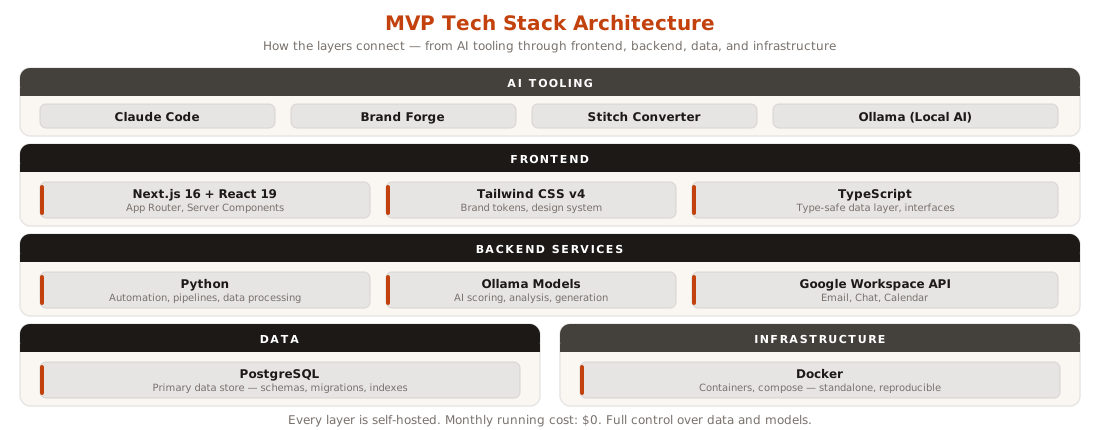
For my stack, I have settled on Next.js with React for the frontend, Python for backend services and automation, PostgreSQL for data, and Docker for deployment. Ollama handles local AI inference when I need it. This is not the only valid stack, but it is one I know deeply, and that matters more than chasing whatever is newest.
This structure is what makes the AI coding sessions productive later. You are not asking the AI to figure out what to build. You are handing it a spec and asking it to implement a defined solution.
Step 5: Build the Product with the 70% Approach
This is where AI coding tools earn their keep. The approach I have learned to trust is what I call the "70% solution." AI gets you roughly 70% of the way to working code. Your job is to guide, refine, and handle the remaining 30% where the real product decisions live.
The key difference now is that you are not designing as you code. The brand system from Step 2 gives you the colors, fonts, spacing, and component styles. The approved Stitch prototypes from Step 3 give you the screen layouts and user flows. The roadmap from Step 4 tells you exactly what to build this cycle, and the specs define how each piece should work. You are implementing a defined plan, not inventing one as you go.
Here is the practical workflow:
Scaffold the project structure. I use starter projects that have basic component stubs. This saves time and provides scaffolding for Claude to enhance.
Apply the brand system from day one. The design spec from Brand Forge includes a Tailwind config you can paste directly, CSS custom properties, and component style definitions. These go into the project before any feature code. Every component built from this point forward uses the brand tokens, not arbitrary color values.
Pull the look and feel from Stitch prototypes. The approved screen designs become the reference for building real components. The AI coding assistant takes a screen description and produces a component that matches the layout. You refine the details: interaction states, transitions, loading behavior. The structure comes from the prototype. The polish comes from you.
Build features in focused sessions. I describe one feature at a time, as specifically as possible. "Create a React component that displays a list of projects with their status, due date, and assigned team member. Use a card layout with the brand's charcoal-200 borders and terracotta accent for active states." The more specific the prompt, the closer the output is to what I need.
Be practical about code review. If AI is producing 300% to 500% more code than you wrote before, you cannot realistically review every line. What I do instead: focus manual review on the critical areas first. Security for endpoints, boundaries where your system talks to other systems, permissions logic, and observability code. Those are where mistakes actually hurt. Then I run additional AI review passes challenging it to find missed security issues and simplify where possible. Two or three focused passes catch more than one exhaustive pass where your eyes glaze over.
One practice that compounds over a project: at the end of each work session, I have the AI review everything that caused problems during that session. Errors it introduced, patterns that did not work, assumptions it got wrong. The AI documents those lessons so the next session starts smarter. Over weeks of development, this builds a project memory that makes each cycle more productive than the last.
The 70% approach works because it respects both what AI is good at (generating syntactically correct, conventional code quickly) and what it is not good at (understanding your specific business context, making product trade-offs, knowing which corners to cut and which to reinforce).
Step 6: Connect the Data Layer
Databases, APIs, and integrations are where AI handles boilerplate while you focus on business logic. This split works well because the boilerplate is genuinely tedious and the business logic is where your specific knowledge matters.
For database work with PostgreSQL, I describe the schema I planned earlier and have the AI generate migration files, query builders, and data access functions. It handles the SQL syntax and connection management. I focus on ensuring the queries match real usage patterns and that indexes are in the right places.
For API integrations, I have found AI particularly useful:
- Google Workspace API connections. When I built the daily business intelligence report, the AI generated the OAuth flow and API client code. The Google APIs have extensive documentation that AI models have been trained on, so the generated code is usually close to correct.
- Webhook handlers. Setting up endpoints that receive and process webhooks from external services is mostly mechanical. AI writes it quickly and accurately.
- Data transformation pipelines. Converting data between formats, cleaning inputs, normalizing structures. This is exactly the kind of repetitive, pattern-based work AI handles well.
Where I stay hands-on is the business logic layer between the data sources and the user-facing features. When building the lead pipeline, the AI generated the scoring algorithm structure, but the actual weights and decision logic came from my understanding of which signals matter for my business. AI does not know that a prospect who mentions a failed implementation attempt is more valuable than one with a bigger budget. You do.
Step 7: Test, Find Edge Cases, and Iterate
AI is surprisingly useful for testing, but not in the way most people think. The real value is not in generating test files (though it does that). It is in finding edge cases you did not consider.
My testing workflow:
Ask AI to identify edge cases. Describe a feature and ask, "What could go wrong?" The responses are genuinely useful. It will flag race conditions, null states, boundary values, and error scenarios that are easy to miss when you are focused on the happy path.
Use AI as a design partner, not just a coder. The higher value work is not generating test files. It is having the AI challenge your design decisions before you commit to them. "This spec assumes one quote per project. What happens when a client needs a revised quote?" That conversation saves you from a database migration three weeks from now. The AI has seen enough codebases to spot structural decisions that will cause pain later.
Use AI for refactoring. After a feature works, I often ask the AI to review the code and suggest improvements. It catches duplicated logic, inconsistent error handling, and opportunities to simplify. Not every suggestion is good, but about half of them improve the code.
Manual testing remains essential. I click through every flow myself. AI cannot tell you that a button feels too small on mobile or that the loading state is disorienting. These are human judgments.
The iterative cycle looks like this: build, test manually, ask AI for edge cases, write targeted tests, refactor, repeat. Each pass makes the product more solid. I typically go through three or four rounds before something is ready for production.
Step 8: Deploy to Production
The gap between "it works on my machine" and "it works everywhere" is where many MVPs stall. Docker makes this manageable, and AI makes Docker less painful.
My deployment workflow:
Dockerize early. I generate the Dockerfile and docker-compose configuration as soon as the project has a basic working state. AI writes reasonable Docker configurations. I review them for security basics (do not run as root, staged builds to reduce image size, proper environment variable handling).
Infrastructure as code. For production deployments, I define everything in configuration files. The AI helps generate these, but I audit every setting. One wrong port mapping or exposed volume can create a real problem.
Environment management. Development, staging, production. Each needs its own configuration. AI helps generate the templates, and I fill in the specifics. Secrets management is one area where I do not trust AI suggestions at all. I handle credentials, API keys, and connection strings manually.
Monitoring and logging. Basic health checks, error logging, and uptime monitoring get set up before launch. AI generates the instrumentation code. I decide what to monitor and what thresholds matter.
For my projects, I deploy to environments where I control the infrastructure. The lead pipeline runs as a set of Docker containers. The business intelligence system runs on a scheduled pipeline. Each one is reproducible from the configuration files, which means I can rebuild the entire stack from scratch if needed.
The Honest Truth About AI-Assisted Development
After building several production systems this way, here is what I have learned about AI as a development tool.
What AI is genuinely good at:
- Generating boilerplate and repetitive code. It saves hours on the work nobody wants to do.
- Flushing out specifications through conversation. Describe what a feature should do and the AI will ask the questions you missed, surface edge cases, and help you write a spec tight enough to build from.
- Answering specific technical questions. "How do I set up WebSocket connections in Next.js?" gets a useful, working answer most of the time.
- Synthesizing information from documentation and patterns. It has read more docs than you have.
- First draft code that is structurally sound. The architecture is usually reasonable even if the details need work.
Where AI falls short:
- It does not understand your business. It generates plausible solutions that may not fit your actual context. You must bring the domain knowledge.
- It introduces subtle bugs. Code that looks correct but fails under specific conditions. The more complex the logic, the more likely this is.
- It adds unnecessary complexity. AI tends to pile on abstraction layers, design patterns, and overhead that a small project does not need. I spend a meaningful amount of time simplifying what it generates.
- It has weak memory across sessions. Context about your project drifts as conversations get long. I have learned to keep focused sessions and re-establish context frequently.
- It cannot make product decisions. "Should we require email verification at signup?" is a business question, not a technical one. AI will give you both options. You have to choose.
How to get the most from AI tools:
- Be specific in your prompts. "Build a dashboard" gets generic output. "Build a dashboard that shows three KPI cards at the top, a line chart of daily revenue for the past 30 days, and a table of recent orders with status filters" gets something useful.
- Work in focused sessions on one feature at a time. Do not try to build the entire application in one conversation.
- Focus your review time on security, system boundaries, and permissions. Use AI to review its own output in focused passes rather than trying to read every line yourself.
- Use AI for the parts of development that are mechanical, and invest your own time in the parts that require judgment.
- Keep your own architecture decisions documented. The AI does not remember your choices from last week.
The real workflow is not "AI builds the app." It is "I build the app, and AI handles the parts where my time is better spent thinking instead of typing." That distinction matters. The builder is still you. The tool just got significantly more capable.
From prototype to production, the process has not changed. You still need to validate the idea, establish the brand, prototype the visual direction, plan the architecture, build incrementally, test thoroughly, and deploy carefully. What has changed is the speed at which you can move through each step and the amount of mechanical work you can offload. For a solo builder, that difference is the gap between an idea that stays in a notebook and a working product that serves real users.
That is the complete workflow. Not magic. Not theory. Just a faster, more capable way to build real things.
Want to Discuss This?
Let's connect and explore how AI can work for your business.
Start a Conversation